
LESSON 01 / 記事 LESSON 01 / Article
ClaudeとClaude Codeの違い・できること Claude vs. Claude Code: what each can do
この講座でできるようになること What you will learn
- 作業フォルダーを開き、目的と完成条件を伝えられる Open a working folder and communicate your goal and acceptance criteria
- 紹介ページを作り、ブラウザーで見た目と動きを確認できる Build an introductory page and check its appearance and behavior in a browser
- 変更を直し、CLAUDE.mdで次の作業へ引き継げる Fix changes and use CLAUDE.md to carry context into your next session
コードを知らなくても、最初の一歩は踏み出せる You can take the first step without knowing how to code
Claude Codeは、作業フォルダーのファイルを読み、編集し、コマンドを実行して仕事を進めるAIツールです。「こう作るとよい」と回答するだけでなく、実際のファイルを作れます。その分、 Claude Code is an AI tool that reads and edits files in a working folder and runs commands. It can create actual files, beyond suggesting how to build something. That makes it important to 何を変えたかを自分で確かめる check what changed yourself ことが大切です。.
普通のClaudeとClaude Code、どう違う? How does Claude chat differ from Claude Code?
ここでいう「普通のClaude」は、claude.aiやClaudeアプリの**Chat(チャット)**です。Claude Codeは同じClaudeの能力を、プロジェクト内の作業に使うための道具です。単純な上位版・下位版という関係ではありません。 Here, “Claude” means Chat on claude.ai or in the Claude app. Claude Code applies the same Claude capabilities to work inside a project. Neither is simply a higher or lower tier of the other.
相談や資料から始める Start with a conversation or documents
会話やアップロードした資料を中心に、考える・まとめる・作る。 Think, summarize and create around conversations and uploaded materials.
- 文章の相談・要約・リサーチ Writing advice, summaries and research
- ファイルやArtifactsの作成 Create files and Artifacts
- 利用環境に応じてコネクター・Skillsも使用 Use connectors and Skills where supported
例:紹介ページに載せる文章を考える Example: draft the copy for an introductory page
プロジェクトから始める Start with a project
指定した環境で、ファイルを読み、編集・コマンド実行・検証を進める。 Read and edit files, run commands and verify results in a chosen environment.
- 複数のファイルを調べて変更 Investigate and change multiple files
- アプリの実行・テスト・差分確認 Run apps and tests, and review diffs
- CLAUDE.md・Skills・Hooks・MCPで拡張 Extend with CLAUDE.md, Skills, Hooks and MCP
例:既存の紹介ページを修正して確認する Example: update an existing page and check it
Claudeのチャットでもコードやファイルは作れます。「ファイルを作れるか」だけが違いではありません。 Claude chat can also create code and files. File creation alone is not the distinction. どの環境のファイルを、どのツールで操作するか Which environment and tools you work with がポイントです。Claude CodeのWeb版などはクラウド環境で動くため、常に自分のPCを直接操作するわけでもありません。 is the key. Claude Code on the web runs in a cloud environment, so it does not always operate directly on your PC.
- 01Chatで相談 Discuss in Chat 文章・構成・参考案を練る Develop copy, structure and ideas
- 02Codeで実装 Build in Code 材料を読み、ページを作る Read the materials and create the page
- 03自分で確認 Review it yourself 表示・内容・動きを確かめる Check appearance, content and behavior
このように組み合わせてもよく、Claude Codeに相談から任せても構いません。2つを契約し直す必要がある、という意味ではありません。利用できる機能と課金はアカウントで確認します。 You can combine these approaches or start the discussion in Claude Code. This does not mean you need two new subscriptions. Check your account for available features and billing.
迷ったら、今したいことで選ぶ Choose based on what you want to do now
Claude DesktopのChat・Cowork・Codeは別の入口です。この講座ではターミナルのClaude Codeを使います。チャット欄にターミナルのインストールコマンドを送る操作とは区別してください。 Chat, Cowork and Code are separate entry points in Claude Desktop. This course uses Claude Code in the terminal. Pasting an installation command into a chat box is not the same operation.
- 01あなたが依頼 You make a request 目的と材料を渡す Provide the goal and materials
- 02Claude Codeが作業 Claude Code works 読む・編集する・確認する Read, edit and check
- 03あなたが確認 You review 実物を見て、必要な修正を伝える Inspect the result and request changes
この講座では「旅の日本語」という架空サービスの紹介ページを1枚作ります。練習なので、購入・送信・インターネットへの公開はしません。 We will build a one-page introduction to a fictional service, “Travel Japanese.” This is a practice project: no purchases, messages or public deployment.
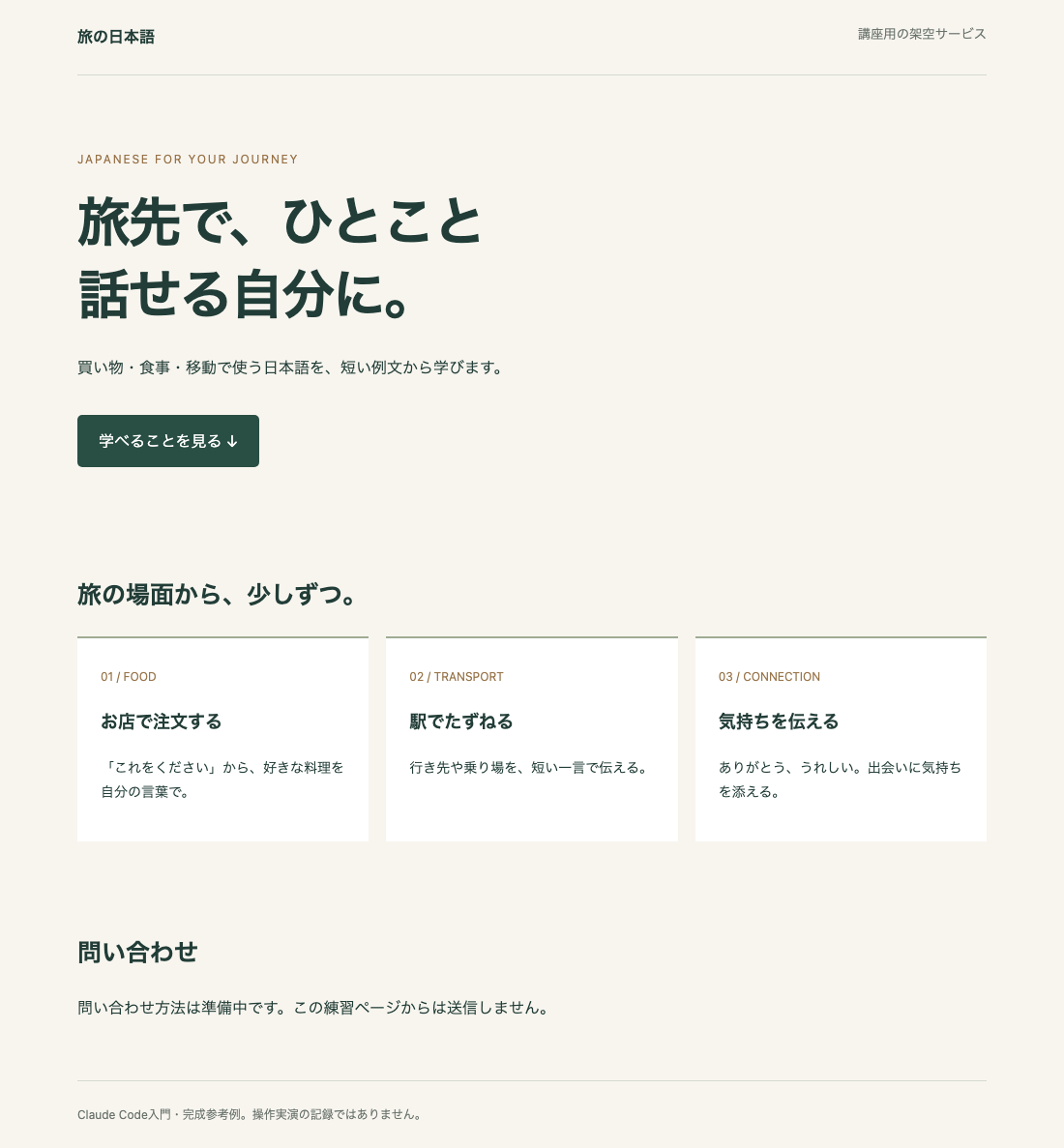
完成参考例を開く Open the reference example / 練習用ファイルをダウンロード Download practice files
参考例は講座用に用意したものです。Claude Codeの実行画面や、同じ入力なら必ず得られる出力ではありません。大事なのは同じ絵を再現することより、自分で依頼・確認・修正できることです。 This reference was prepared for the course. It is not a capture of Claude Code running, or a guaranteed output from the same input. Focus on requesting, reviewing and revising, rather than reproducing an identical design.
まず覚える3つの言葉 Three terms to learn first
| 言葉 Term | この講座での意味 Meaning in this course |
|---|---|
| フォルダー/プロジェクト Folder / project | この作業に使うファイルの置き場 Where the files for this task live |
| ターミナル Terminal | 文字でコンピューターに指示を出すアプリ An app for giving your computer written instructions |
| コマンド Command | claudeなど、実行するために入力する文字列: text you enter to run an operation |
Claude Codeが動く場所にはターミナル、VS Code、Claude Desktop、Webなどがあります。 Claude Code is available in environments including the terminal, VS Code, Claude Desktop and the web. この講座の操作例はターミナル版 This course demonstrates the terminal version です。画面が違っても「依頼→変更確認」の考え方は共通ですが、ボタンやコマンドの場所は同じではありません。. The request-and-review approach is shared, but buttons and commands may be in different places.
得意なことと、任せきりにしないこと What it does well—and what you still need to check
資料からページを作る、既存ページを直す、コードを説明する、繰り返し作業を小さなプログラムにする、といった用途に使えます。一方で、料金・契約条件・口コミなどの事実は人が渡します。AIが足したもっともらしい文章を、確認せず自分の実績として公開しません。 Use it to build pages from briefs, edit existing pages, explain code or automate small repetitive tasks. People must supply facts such as prices, terms and testimonials. Do not publish plausible AI additions as your own achievements without checking them.
公式資料 Official resources
Claude Codeの概要 Claude Code overview / Academy:Claude Code 101。2026年9月11日参照。. Accessed September 11, 2026.
比較の出典: Comparison sources: Claude Code概要 Claude Code overview 、Desktopの各タブ Desktop tabs 、公式Skillsリポジトリ Official Skills repository 。
TRY IT YOURSELF
やってみる Try it
完成参考例を開き、文章・見た目・動きのうち、自分なら変えたいところを1つ選びます。 Open the reference example and choose one thing you would change in its copy, appearance or behavior.